CRM Hygiene Automation: Prevent Bad Data and Review Duplicates Safely
CRM hygiene automation continuously checks customer data, prevents avoidable defects and routes uncertain repairs to an accountable owner. It covers completeness, validity, identity, freshness and relationships—not just duplicate deletion.
At Stob.AI, our starting point is that a clean-looking CRM can still be operationally wrong. A contact can have every field populated but belong to the wrong company. A deal can be marked active because an integration updated it yesterday, although the buyer has not engaged for months. An enriched phone number can overwrite a number the customer explicitly supplied.
The objective is trustworthy working data for the process you run. This guide explains how to establish quality rules, prevent defects at entry, review duplicate candidates and verify repairs without letting an AI model guess which records should disappear.
Six dimensions of CRM hygiene
| Dimension | Example defect | Useful control |
|---|---|---|
| Completeness | An active opportunity has no accountable owner | Required-field rules appropriate to that stage |
| Validity | Country field contains a value the routing rule cannot interpret | Validated allowed values at entry |
| Consistency | Account territory differs across CRM and campaign tool | Field ownership and reconciliation policy |
| Identity | Two records represent one person, or one record represents two | Explicit entity-matching evidence |
| Freshness | A contact changed employer but the old affiliation remains active | Evidence dates and review triggers |
| Relationships | A deal is linked to the wrong company or contact | Association checks, not contact checks alone |
Define applicability before measuring completeness. A dormant archived record may not need the fields required for an active proposal. Adding placeholder values everywhere can improve a dashboard while making the data less useful.
Audit the business population that matters
Start with a named cohort such as open opportunities and their associated contacts, or new inbound records created during the last month. Record its size, business purpose, entry paths and quality rules. Archive cleanup and active-pipeline reliability are different projects.
Inspect where defects originate: imports, forms, enrichment providers, rep entry, API integrations and synchronization. A one-off cleanup followed by unchanged intake usually rebuilds the same backlog.
Give each rule an owner. Sales Ops might define valid stages, a commercial leader defines required qualification evidence, and the data owner defines retention. The implementation team translates those decisions into checks; it should not invent the business policy.
Identity is the foundation—not a confidence score
A CRM record ID identifies a stored object. An external source ID links it to a source system. Email, phone and domain can help identify a person or company but have edge cases: shared inboxes, recycled numbers, subsidiaries, personal email and employment changes.
HubSpot documents automatic deduplication by contact email and company domain, plus import matching through Record ID or unique-value properties. Do not assume the same behavior applies to every API entry path. Test the actual connector and operation.
Salesforce distinguishes matching rules from duplicate rules: identifying candidates is separate from deciding what to do about them. Adopt the same conceptual separation even when your CRM implements it differently.
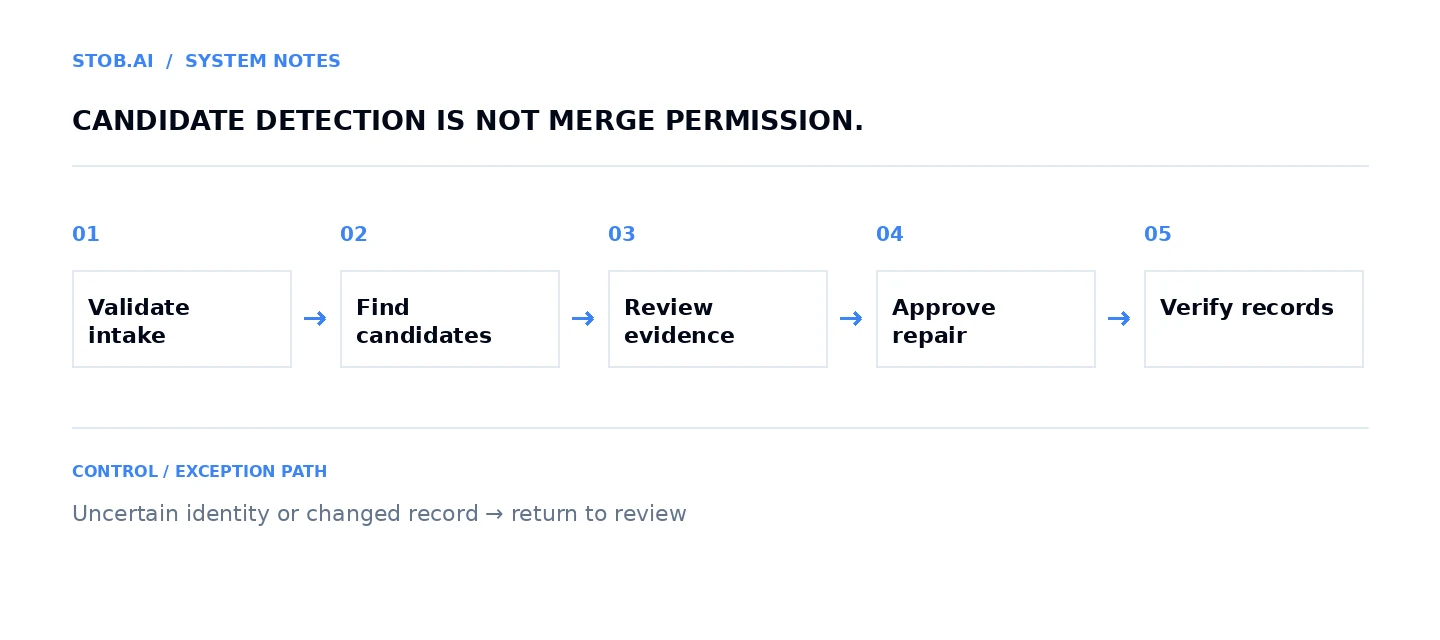
AI can summarize conflicting evidence or propose possible matches. It should not convert a high similarity score into automatic destructive permission. An exact shared email may still represent several legitimate people; a company-name match may conceal separate legal entities.
Prevent defects before repairing them
- Validate intake: reject or quarantine missing required fields and unsupported values.
- Normalize carefully: standardize whitespace and known country codes; preserve original values where useful. Avoid indiscriminate changes to email local parts or culturally varied names.
- Use stable keys: retain source identifiers and destination mappings rather than repeatedly matching by display labels.
- Check before writing: retrieve current values and apply the approved field precedence.
- Protect trusted data: enrichment can propose a replacement, but should not silently overwrite customer-supplied or approved information.
- Record provenance: retain source, observed date, proposed change and approver for consequential repairs.
Write rejection reasons back to the originating process. If an import consistently lacks owner IDs, fix the export or mapping rather than making the hygiene queue responsible for perpetual repair.
Build a duplicate-review queue with a survivorship policy
Before a merge, name the surviving record and decide which field values survive. Preserve associations, consent restrictions and external mappings. The latest value is not automatically the most trustworthy; a fresh enrichment guess can be less reliable than an older verified customer statement.
| Review question | Evidence required |
|---|---|
| Are these the same entity? | Approved matching signals and conflicting evidence |
| Which record survives? | Record history, active relationships and downstream dependencies |
| Which fields win? | Field-level precedence, source and observation date |
| What happens to restrictions? | Conservative preservation of suppression and permission state |
| What references must change? | External ID mappings and connected object associations |
| Who may execute? | Validated permissions for the actual UI or API operation |
HubSpot states that records cannot be unmerged and documents merge permissions. Its duplicates manager also has subscription and permission requirements. Access to CRM records does not imply access to every repair feature.
HubSpot also documents that activities can take up to 30 minutes to synchronize after a merge. Both records leave active workflows unless the Primary ID Preservation beta applies; that beta preserves primary-record enrollment. Merge-driven enrollment needs explicit configuration. With Salesforce, only the primary contact continues syncing; company-merge support depends on the integration version. Test your account configuration and verify downstream workflow and sync behavior after the synchronization window before closing the repair.
Salesforce's SOAP merge documentation describes combining supported same-type records, deleting non-main records and reparenting related records. Preserve intended field values deliberately. Validate object support, permissions and relationship effects in your actual environment.
A snapshot helps reconstruct what happened and may aid repair. It is not a promise that a merge is reversible. Do not put an “undo” claim in the operating procedure unless the exact operation has a tested undo path.
Example: nightly hygiene review for active contacts
Make retrieves a defined active cohort and evaluates deterministic rules first. Missing owner, invalid country or absent company association becomes a labeled issue. Candidate matching produces a separate review item containing both record IDs and supporting evidence.
Claude or OpenAI can summarize the conflicts but receives no merge permission. An authorized reviewer selects the survivor and field winners. Immediately before execution, retrieve both records again and check that the approval still describes the current state.
After a permitted merge or repair, verify surviving values and associations. Update external mappings, record the outcome and close the item only after those checks pass. If any part is uncertain, leave the item visibly unresolved instead of treating an accepted API call as a completed cleanup.
Test the cases a tidy demo hides
Include shared inboxes, company-name changes, subsidiaries, departed contacts, conflicting opt-outs, concurrent updates and a timeout after a successful merge. Test a user who can read but cannot execute the operation. Check whether enrichment and downstream systems recreate the retired record.
The safe response to uncertainty is often a hold, not another retry. Destructive operations need a stronger approval and verification standard than formatting a non-authoritative display field.
Metrics that distinguish repair from improvement
- New-record defect rate: new records failing defined checks within a fixed observation window divided by new records assessed with that same window.
- Required-field completeness: populated required-field instances divided by applicable required-field instances in the cohort.
- Duplicate-affected record rate: distinct records in confirmed duplicate groups divided by records assessed. Count each record once.
- Candidate precision: reviewed candidates confirmed duplicate divided by all reviewed candidates. This does not measure undiscovered duplicates.
- Incorrect-merge rate: executed merges later adjudicated incorrect divided by merges in the tracked cohort.
- Recurrence: repaired entities that develop the same defect again within a specified window.
A cleanup that merges many records may look productive while having poor candidate precision. Track false positives and missed issues separately. Changes in assessed populations can also distort trends; compare like-for-like cohorts.
Stob.AI's recommendation
Use native tools when their supported checks and review process are enough. Add orchestration when defects arrive through several systems. Consider specialist entity-resolution tooling when scale and matching complexity exceed rules the team can maintain.
We would rather prevent one recurring defect at its source than automate a large destructive cleanup. Reliable data makes CRM automation, sales handoffs and deal reactivation safer; it does not justify removing human ownership from uncertain identity decisions.
Frequently asked questions
What is CRM hygiene automation?
It checks and improves completeness, validity, consistency, freshness, identity and relationships, while preventing new defects and routing uncertain repairs for review.
Should AI automatically merge duplicate CRM records?
Not from similarity alone. Confirm identity, survivorship, consent, associations and downstream references, then use an authorized, verified merge operation.
Can a HubSpot record merge be undone?
HubSpot states that merged records cannot be unmerged. A snapshot may help repair but is not a reversible merge or a guaranteed rollback.
How do you know CRM hygiene is improving?
Measure defects in new records, confirmed duplicate-affected records, candidate precision, incorrect merges and recurrence in consistently defined cohorts.