CRM Automation: Workflows, Integrations and a Safe Implementation Plan
CRM automation uses triggers, rules and connected tools to update customer records, create tasks, route work and verify follow-up without repeating every step manually. AI can interpret messy context within that process; it does not replace the CRM's role as the commercial record.
At Stob.AI, we start by asking which part of the sales process is failing. If the existing CRM can solve it with native configuration, that is often the best answer. When the process spans inboxes, research, approvals, calendars and delivery tools, the missing capability may be an operating layer between applications rather than another CRM.
This guide is for teams that want a connected process without starting again. It covers workflow selection, architecture, safe implementation and measurement. For the specialist data-quality problem, read CRM hygiene automation.
CRM automation is more than sending sequences
A sequence automates communication steps. CRM automation can also manage intake, associations, ownership, tasks, stage evidence and downstream handoffs. More messages do not solve incomplete records or salespeople receiving leads without context.
| Workflow | Useful automated outcome | Boundary |
|---|---|---|
| Lead intake | Validated record linked to its source and owner | Uncertain identity goes to review |
| Follow-up | Task or approved communication based on current state | Recheck opt-outs and active conversations |
| Meeting preparation | Source-linked account summary and missing-information flags | Do not invent qualification or buying intent |
| Opportunity administration | Missing evidence surfaced to the owner | No silent rewriting of commercial commitments |
| Closed-won handoff | Accepted delivery packet with a verified project reference | Scope and terms need accountable approval |
Choose native configuration before adding another layer
A native CRM workflow is usually preferable when the required trigger, conditions and actions are supported inside one product. It may give the team a simpler permission model and a familiar place to inspect changes. Check the actual subscription, object support and limits; a vendor's product overview is not proof that your account has every feature.
Use Make orchestration when completion depends on several tools, the process needs a shared exception queue, or the native feature cannot represent the required steps. Custom engineering becomes relevant when unsupported interfaces, throughput or consistency requirements exceed what a maintainable scenario can provide.
Do not build an external layer just because AI is available. If a dropdown and a territory rule determine ownership reliably, a model adds cost and uncertainty without adding judgment. The automation versus SaaS decision guide explores this trade-off in more detail.
Agree what each system owns
A connected stack needs a field-level source-of-truth map. The CRM might own account relationships, deal stages and salesperson assignment. An operational database might own work-item status and execution history. An outreach tool supplies actual sending and reply evidence. These responsibilities can vary, but they cannot remain implicit.
HubSpot's CRM API documentation distinguishes objects, records, properties and associations. Map those separately. Record IDs, contact emails and company domains are not interchangeable identifiers.
| Data | Proposed owner | Conflict rule |
|---|---|---|
| Account owner | CRM | Existing assignment wins unless an approved rule changes it |
| Work-item status | Operating ledger | Only verified outcomes advance to completed |
| Message delivery | Sending provider | Use provider evidence, not a workflow's intention to send |
| Customer restrictions | Governed consent/suppression record | Current restriction blocks conflicting action across channels |
| AI summary | Derived field with provenance | Never overwrite authoritative source material |
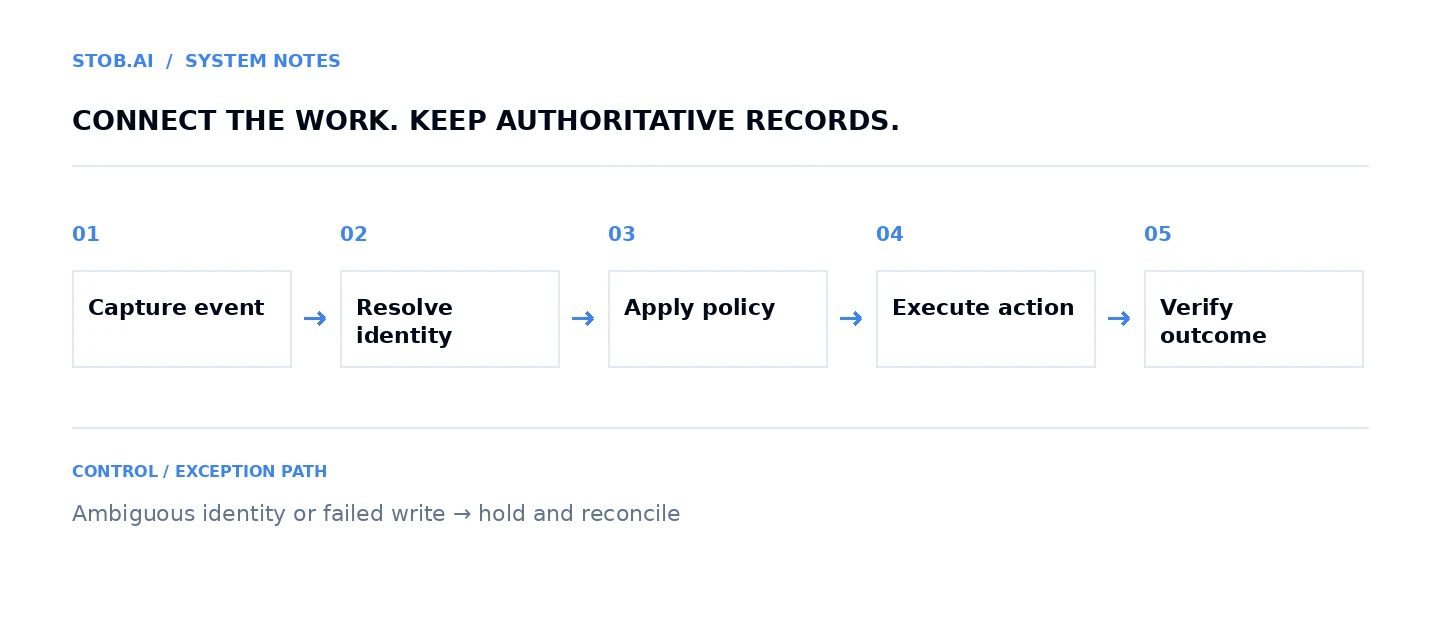
Walkthrough: inbound enquiry to a verified next action
Capture and authenticate
Receive a form or supported webhook, validate its origin and save a stable submission identifier. Make supports custom and application webhooks, with polling where webhook support is absent; see Make's webhook guidance. Verify the connector's actual event behavior rather than assuming all changes arrive immediately.
Resolve the record
Use stored CRM identifiers or an approved unique external key. Validate required values and look for existing account relationships. An email can help matching but does not prove every relationship. If several plausible records exist, create a review item with the candidates.
Salesforce's SOAP upsert documentation explains create-versus-update matching through external-ID or eligible lookup fields. Upsert is not merge, and available keys depend on the object and API.
Apply policy and bounded interpretation
Use deterministic rules for territory, required fields and allowed owner changes. Send only the relevant free-text request to Claude or OpenAI to propose a need category and supporting evidence. Give the model an unknown option. External enquiries are data, not trusted instructions to change the workflow.
Approve where the consequence warrants it
A reversible internal task may run under a standing approved policy. A commercial commitment, ownership conflict or sensitive customer message should require a current human decision. Bind approval to the record version and proposed action, not a vague “approved lead” flag.
Write, verify and reconcile
Make performs the permitted update, retrieves the resulting record and records its identifier and outcome. If the response times out after a write, inspect the destination before repeating it. Supported batch operations may return per-record outcomes: HubSpot's error guidance documents authorization errors and supported multi-status behavior. One successful request is not proof that every record succeeded.
Prevent feedback loops and duplicate writes
Two-way synchronization can turn one field change into repeated events. Retain event origin, operation identity and last verified value. Ignore changes that do not alter the relevant business state; do not ignore all events from an integration account because some may be legitimate.
Define which writes may run concurrently. A duplicate check followed by creation is not atomic. Use destination-supported idempotency, locking or serialized work processing where necessary. Reconciliation is especially important when another team or integration writes to the same object.
Keep mappings explicit when an object changes. A renamed field label, new mandatory property or deleted owner can break a previously successful flow. Version the mapping and test changes in a safe environment before production.
Security and operational access
Give each integration the permissions needed for its defined job, not unrestricted administrator access for convenience. Separate test from production connections. Put credentials in the approved secret store and make renewal and revocation someone's responsibility.
Minimize data sent to models and stored in execution logs. “Not used for training” is not the same as “never retained”; review OpenAI's API data controls against the actual endpoints you use. Apply access and retention controls to the CRM, orchestration platform and model provider separately.
How to pilot without automating a bad process
- Map: describe one workflow, its trigger, owner and accepted result.
- Baseline: sample ordinary cases, exceptions and actual manual effort.
- Dry-run: produce proposed changes without writing to live records.
- Test: include duplicates, missing fields, permission failures, stale approvals and interrupted writes.
- Release narrowly: enable one cohort with a named incident owner and pause control.
- Review: inspect errors, rejected recommendations and adoption before increasing scope.
Measure verified completion rate across all eligible items due, review minutes per reviewed item and total operating cost per accepted outcome. Report released staff capacity separately from cash savings; time saved does not automatically reduce payroll.
Where Stob.AI fits
We build connected workflows inside existing tools and make data ownership, exception handling and team operation part of the implementation. Our Lumens case study shows an Airtable operating layer alongside Zoho rather than a CRM replacement.
For the next design decision, use sales handoff automation to define acceptance, CRM hygiene automation to prevent unreliable inputs, and AI sales agents to separate interpretation from execution.
Frequently asked questions
What is CRM automation?
CRM automation uses triggers, rules and integrations to update records, create tasks, route work and verify follow-up. AI can interpret context within those controlled workflows.
Do I need to replace my CRM to automate sales operations?
Usually not. Configure supported native workflows first, then connect other tools where the process crosses application boundaries.
What is the difference between CRM automation and an AI sales agent?
CRM automation manages the reliable process and record changes. An AI sales agent interprets context, prepares recommendations or plans bounded tasks inside that process.
Which CRM workflow should be automated first?
Choose a frequent, clearly defined workflow with reliable identity, explicit permissions, a verifiable result and an owner for exceptions.