Choosing AI and Workflow Automation Tools in Practice: Claude, OpenClaw, Make, n8n and More
If you spend enough time on LinkedIn right now, you could easily come away believing Claude Code is the answer to everything, or that installing OpenClaw on a Mac mini will magically solve every operational problem.
Every second post seems to imply the same thing: open the terminal, prompt hard enough, let the agent run, connect a few tools, and suddenly your CRM, follow-ups, customer handoffs, internal processes, reporting, data updates and business operations are all solved.
I understand why that idea is attractive.
It sounds faster. It sounds cheaper. It sounds like the messy middle of operations can finally disappear.
But I do not think that is what is happening.
The market is not moving toward "one agent does everything." It is moving toward a more interesting pattern: agents sitting inside controlled workflow systems.
That distinction matters.
A workflow has to be repeatable. It has to be debuggable. It has to have owners, state, approvals, permissions, failure handling and logs. An agent can help inside that workflow, but it should not automatically become the workflow itself.
Claude Code is useful. Very useful. Anthropic describes Claude Code as an agentic coding tool that can understand codebases, edit files, run commands and help with development workflows.
OpenClaw is also useful. Very useful. The OpenClaw docs describe it as a self-hosted gateway that connects chat apps and channel surfaces to AI coding agents and assistants, including channels such as Slack, Telegram, WhatsApp, Signal, Discord and others.
But neither of those things removes the need for workflow architecture.
That is the part I think a lot of the market is getting wrong.
AI agents are brilliant when the work is messy, language-heavy or judgment-based. Workflow automation is still better when the work needs to be consistent, cheap, auditable and tied into systems of record.
So the question is not "can an agent do it?"
A lot of the time, yes, it probably can.
The better question is: should this be agent-led, rule-led, or a hybrid?
That is where the practical advantage is.
The companies that win with AI operations will not be the ones that let agents freestyle across the business. They will be the ones that use agents selectively inside workflows that are already well designed.
Most of my work sits around commercial operations: lead workflows, enrichment, outreach, reply handling, CRM updates, approvals, client delivery processes, internal tracking and agent-assisted tasks. That is why I care less about which tool has the best demo, and more about where the workflow will live after the demo is over.
So this is my current map for workflow automation.
My preferred workflow automation stack is:
- Make for most business workflow automation.
- OpenClaw for agent access, personal command surfaces and channel-based delegation.
- Airtable for operational databases and workflow visibility.
- Supabase when workflows need to touch application data.
- Claude Code for codebase-native work that supports automations, but not as the automation layer itself.
The strong alternatives and adjacent tools I keep in the conversation are:
- n8n when the workflow is more technical, self-hosted or code-heavy.
- Coda when the workflow is more doc-centric than database-centric.
- Snowflake when the workflow sits around enterprise analytics or governed data.
- monday.com when a team wants work management, CRM-style workflow tracking and automation in one connected workspace.
- Relevance AI when the focus is building agent teams and operational AI workflows with governance, connectors and human oversight.
The question is not "which tool is best?"
The question is "where should this workflow live?"
That distinction matters.
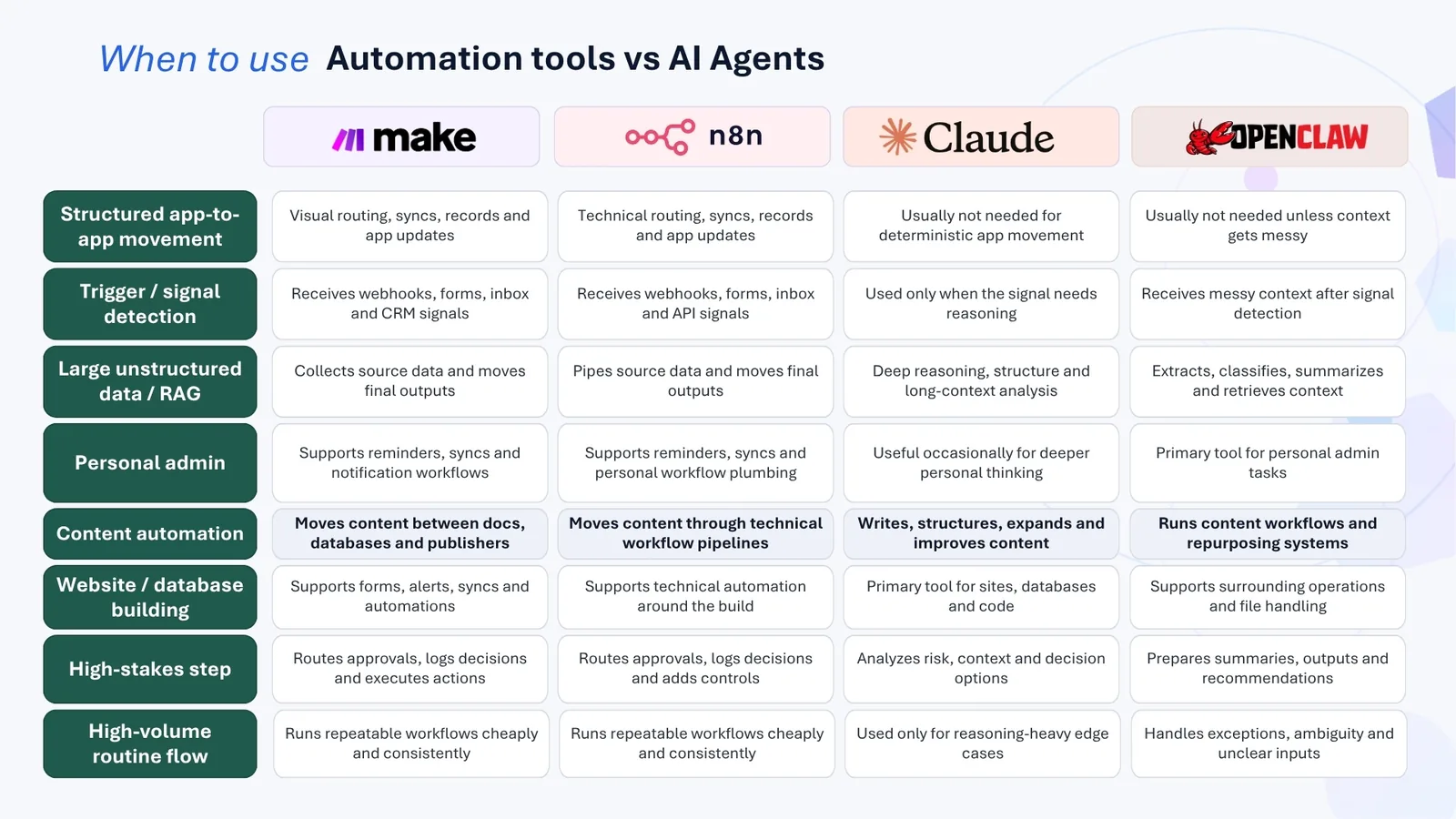
The mental model: workflow automation has layers
I think about workflow automation in layers.
There is the orchestration layer. This is where Make or n8n lives. It is responsible for triggers, branches, actions, retries, payload transforms, scheduled jobs, webhooks and handoffs between systems.
There is the agent layer. This is where OpenClaw, Claude and other assistants sit. This layer is about language, delegation, reasoning, drafting, tool use and human-in-the-loop control.
There is the operational data layer. This is Airtable or Coda territory. It is where people see the work, edit records, manage statuses, approve actions and collaborate around structured information.
There is the application data layer. This is where Supabase or another proper backend lives. If the workflow is touching user accounts, product data, permissions or app state, I want that data in a proper backend.
There is the analytics and governance layer. This is where Snowflake belongs. If the workflow is about enterprise reporting, large-scale data, governed AI or cross-company analytics, that is a different category again.
The problem starts when people collapse all of this into one vague sentence:
"AI can automate it."
Maybe it can. But if the workflow is going to run every day, the more important question is:
Where should the automation live, and what should the agent be allowed to decide?
A tool can execute a task without being the right permanent home for the workflow.
That is the difference between a clever demo and a durable operating system.
Make: my default for business workflow automation
Make is usually my first choice for workflow automation.
That preference comes from usage, not theory. I have been using Make every day for about three and a half years, so I know how it behaves when workflows become messy, when APIs fail, when a client changes a process, when a webhook sends the wrong shape of data, or when a business user needs to understand why something did not happen.
I am not claiming it is the most technically powerful automation platform in every possible situation. I like Make because, for the kind of work I do, it hits a useful balance between speed, visibility and maintainability.
Make positions itself as a visual automation platform for connecting apps and automating workflows. Its product pages describe a visual-first no-code platform with thousands of pre-built app integrations.
That visual-first approach matters more than people admit.
A lot of automation is not really an engineering problem. It is an operations problem.
Someone needs to understand what happens when a lead comes in.
Someone needs to see why a customer email did not trigger the right follow-up.
Someone needs to debug the handoff between a form, CRM, spreadsheet, email tool, Slack channel, enrichment provider, AI step and database.
In those situations, Make is strong because the workflow is visible.
You can see the trigger. You can see the branches. You can see the modules. You can inspect the data that passed through each step. You can explain the system to someone who is not a developer.
That last point is underrated.
A lot of automations fail because only one technical person understands them. The workflow technically works, but the business cannot reason about it. When something breaks, nobody knows whether the issue is the CRM, webhook, filter, email tool, enrichment provider, database or AI prompt.
Make reduces that problem because it gives the workflow a shape people can see.
That is why I prefer Make for things like:
- lead routing
- CRM updates
- Slack and email alerts
- enrichment workflows
- scheduled reporting
- form-to-database processes
- webhook-based automations
- simple AI enrichment steps
- internal operations processes
- sales follow-up workflows
- delivery handoffs
- campaign tracking
- approval flows
Make is especially useful when the automation needs to be owned by a business team, not just an engineer.
At Stob.AI, this matters because a lot of the value is not just "can we make the API call?"
It is "can the workflow be understood, trusted and adjusted by the people who own the commercial process?"
That is also why systems like Sales Machine need more than raw AI output. The system has to connect data, triggers, research, approvals, CRM context and follow-up logic in a way that operators can use. The automation has to be visible enough to debug, but flexible enough to handle the messy reality of sales and operations.
Make vs n8n
n8n is the obvious alternative, and I understand why technical teams like it.
n8n describes itself as an AI workflow automation platform for technical teams. Its open-source repository describes a platform that combines visual building with custom code, native AI capabilities, self-hosting options and hundreds of integrations.
That is a compelling offer.
The self-hosting and code-flexibility points matter.
If I need private infrastructure, deeper code control, custom nodes, source-control discipline, more developer-owned workflows or compliance-sensitive automations, n8n becomes much more attractive.
I would look closely at n8n when the workflow is closer to engineering infrastructure than business operations.
For example:
- internal developer tooling
- private data workflows
- compliance-sensitive automations
- workflows that need more code than configuration
- automations that should live closer to infrastructure
- self-hosted AI workflows
- custom logic that would be awkward in a more no-code environment
- workflows where version control and developer review matter more
My preference for Make is partly because of the kind of work I do, and partly because I have been using it every day for about three and a half years.
That matters.
When you use a workflow platform daily, you build a feel for its failure modes, shortcuts, debugging patterns, limits and best practices. Make is the tool I can move fastest in because I know how it behaves under pressure.
So when I say I prefer Make for most business workflow automation, I do not mean n8n is weaker.
I mean Make is my default operating environment.
For a team with stronger engineering ownership, self-hosting requirements or a preference for code-adjacent workflow design, n8n may be the better choice.
For my work, especially when workflows need to be visible to commercial and operations teams, Make is usually where I start.
That is a preference built from usage, not a universal verdict.
OpenClaw: agent access and command surfaces
OpenClaw sits in a different part of the stack for me.
The OpenClaw docs describe it as a self-hosted gateway that connects chat apps and channel surfaces to AI coding agents and assistants.
That is interesting because a lot of work starts in conversation.
WhatsApp messages. Slack threads. Telegram notes. Signal chats. Discord channels. Voice notes. Quick instructions while you are moving between things.
I do not only want an AI assistant inside a browser tab or terminal.
For my own work, I want an agent layer that sits closer to how I communicate during the day. A lot of useful instructions do not start as a Jira ticket or a carefully written prompt. They start as a message, a quick thought, a reply that needs handling, or a task that needs to be pushed into the right system.
That makes OpenClaw useful for:
- personal task delegation
- inbox-style workflows
- calendar-adjacent tasks
- lightweight command-and-control over agents
- agent orchestration from messaging apps
- workflows where the interface should be conversation rather than a dashboard
- tasks that start from WhatsApp, Slack, Signal, Telegram or another channel
The only caveat is that the command surface should not become the whole architecture.
A chat surface is useful because it gives people a natural place to start work, but the workflow still needs structure behind it. OpenClaw is valuable because it gives you an agent access layer. It lets you route instructions from the places where work naturally starts.
But if the workflow needs stable triggers, retries, branching, scheduling, data transforms and operational visibility, I still want Make or n8n involved.
OpenClaw is the command surface.
Make or n8n is usually the automation layer.
Airtable or another operational database is usually the visibility layer.
That separation is what keeps the system sane.
How I use agents and workflows together
The strongest architecture is usually not agents versus workflow automation.
It is agents inside workflow automation.
That is an important distinction.
Rule-based automation should be the backbone. Use it for predictable, repeatable work: moving records between systems, sending alerts, applying approval rules, syncing CRM fields, routing tickets based on known conditions, checking form completeness, updating spreadsheets and triggering follow-up workflows.
Those jobs benefit from being cheap, fast, auditable and consistent.
AI agents should be the judgment layer. Use them when the input is messy, ambiguous or language-heavy: summarizing a customer complaint, classifying an unusual support ticket, extracting intent from a sales call, drafting a response, deciding whether something needs escalation or handling exceptions that do not fit a clean rule.
The simplest way I think about it is this:
AI interprets. Rules execute.
For example, an AI agent might read a support message and decide the likely issue, sentiment and urgency. Then a deterministic workflow routes it, creates the ticket, applies SLA rules, notifies the right team and logs the action.
That keeps the expensive, less predictable part limited to the places where it adds value.
This is something I use a lot at Stob.AI. In practice, the agent is useful when the work requires interpretation, writing, classification, summarization or judgment. The workflow is useful when the work needs routing, state, approvals, repeatability, retries, logging and system updates.
That combination shows up constantly in commercial workflows. An agent might interpret a reply, draft a follow-up, summarize a call note, classify a lead, or turn a messy document into structured output. The workflow then handles the dependable part: update the record, move the stage, trigger the next task, notify the right person, or wait until the next condition is met.
That separation matters.
Enterprises do not only care whether AI can do a task. They care about unit cost, repeatability, audit trails, permissions, failure handling and debugging. Running every workflow through an LLM agent can become wasteful, especially when most business operations are still structured, API-based and rules-heavy.
The risk is assuming that a powerful automation platform plus AI agents automatically creates a good operating system.
It does not.
A visual automation platform can become messy fast if companies do not control it: duplicate workflows, unclear ownership, brittle integrations, hidden business logic and no central review.
The better model is a controlled operating approach with naming standards, workflow owners, versioning, monitoring, cost limits, approval steps and clear escalation paths.
A useful rule of thumb:
- If the same input should always produce the same output, use rule-based automation.
- If the work depends on policy, thresholds or structured data, use rule-based automation.
- If the input is unstructured text, audio or messy human context, use an AI agent.
- If the task needs reasoning, summarization or classification, use an AI agent.
- If the task affects money, legal, security or customer commitments, use a hybrid workflow with human review.
- If the process is high-volume and routine, start rule-based and use AI only for exceptions.
So yes, agents and workflow automation together are the right direction.
The mistake is treating agents as a replacement for automation.
In most business systems, agents are better as selective decision helpers inside a larger deterministic process.
OpenClaw vs Claude Code
Claude Code belongs close to the repo.
It is for editing, debugging, refactoring, explaining, testing and shipping code. It lives naturally in the terminal, IDE, GitHub workflow or developer environment.
OpenClaw belongs closer to the user's command surface.
It is about routing instructions from chat apps and channels to agents. It is more about access, persistence, workflow control and the bridge between human communication and agentic execution.
So my rule is simple:
Use Claude Code when the task is codebase-native.
Use OpenClaw when the task is agent-native.
Use Make or n8n when the task is workflow-native.
That third line is the one people miss.
If I need to fix a bug in an existing codebase, I want Claude Code.
If I want to delegate a task from WhatsApp or Slack to an assistant, I am looking at OpenClaw.
If I need a durable workflow that triggers when a form is submitted, enriches a lead, updates a CRM, notifies a channel, waits three days and follows up based on status, I want a dedicated automation platform.
That is not because agents are weak.
It is because durable workflows need structure.
Airtable: where workflow state becomes visible
Airtable is where I go when I need structure, collaboration and business-friendly workflow visibility.
Airtable describes its platform as a way to build business apps, embed AI into workflows, connect data and scale with enterprise-grade security. Its Omni feature is positioned as a conversational AI app builder that can create tables, interfaces and automations from a natural language description.
For my purposes, the important part is not just the AI app builder angle. It is the operational structure.
Airtable is not just a spreadsheet. It is a lightweight operational database, and that matters because a lot of workflows need somewhere to store state that people can understand.
Who has been contacted? What stage is this lead in? Has the client approved this? Which record needs enrichment? Which message has been sent? Which follow-up is due? Which source produced this result? What needs human review?
That is where Airtable is strong. It gives the workflow a visible place to live, rather than leaving everything buried inside automations, inboxes, Slack threads or hidden API calls.
Records, fields, linked records, views, forms and interfaces give you enough structure to build an operational process without asking everyone to become a developer. The workflow can still be flexible, but the core state is visible enough for a team to use every day.
That is why I use Airtable for CRM-lite systems, campaign trackers, customer research databases, partner pipelines, content calendars, approval workflows, hiring pipelines, delivery dashboards, lead enrichment queues and outbound workflow tracking.
Airtable is best when the team needs to operate on structured data every day. Not just store it, and not just analyze it, but actively work from it.
People need to open the system, understand what is happening, change records, review statuses, assign owners, approve work, add notes and move processes forward.
For workflow automation, that matters because an automation with no visible state becomes a black box, and black-box workflows are where trust goes to die.
Airtable vs Coda
Coda is strong, but it starts from a different center of gravity.
Coda describes itself as an all-in-one collaborative workspace that blends docs, spreadsheets, applications and AI.
That makes it excellent for doc-centric workflows.
If the process begins as a written plan, meeting hub, project brief, operating manual, product requirements document or team workspace, Coda can be very compelling. It lets you mix narrative, tables, buttons and workflows in one place.
But when the core object is structured operational data, I prefer Airtable.
Airtable feels database-first.
Coda feels document-first.
That is the distinction.
I would choose Coda for:
- team docs
- project hubs
- planning documents
- internal playbooks
- collaborative decision-making
- meeting systems
- workflows where narrative context is as important as the data
I would choose Airtable for:
- structured operations
- multi-view databases
- team-facing interfaces
- repeatable processes
- pipeline management
- workflow state tracking
- records that need to move through stages
Coda is better when the doc is the product.
Airtable is better when the database is the product.
Again, neither is better in the abstract.
They are just built around different assumptions.
Monday.com and Relevance AI: notable mentions
Two other tools deserve a place in the conversation, even though they are not my default stack.
monday.com is strong when a team wants work management, CRM-style tracking, automations, dashboards and collaboration in one workspace. It is not where I usually start for cross-app automation, but I understand why many teams like it. If the team already lives in monday.com, there is value in keeping workflow visibility and execution close to where the work is managed.
That makes monday.com useful for:
- team task management
- sales pipeline tracking
- client delivery workflows
- work management dashboards
- simple automations around boards and statuses
- teams that want one shared workspace rather than separate automation and operations tools
Relevance AI is interesting from a different angle. It is focused on AI agents, agent teams, playbooks, connectors, oversight and governance. I would not compare it directly with Make as a general business automation tool. I would compare it more with the emerging category of agent workforce platforms.
That makes Relevance AI worth considering when the workflow is less about moving data between apps and more about giving specialist AI agents a defined job, a set of tools, a process to follow and a way for humans to supervise outcomes.
For me, these sit as notable mentions rather than defaults.
monday.com is compelling when work management is the center of gravity.
Relevance AI is compelling when agent teams are the center of gravity.
Make remains my default when workflow automation across business systems is the center of gravity.
Supabase and Snowflake: the data layers workflows connect into
Supabase and Snowflake belong in this article because workflow automation often depends on the quality of the data layer underneath it.
They are different products, and I would use them for very different reasons.
Supabase describes itself as a Postgres development platform with a Postgres database, authentication, instant APIs, Edge Functions, Live subscriptions, Storage and Vector embeddings.
That makes it useful when workflows need to interact with application data. If a process touches users, permissions, product records, account state, files or application events, I do not want that data patched together in a spreadsheet forever. I want a proper backend with a proper data model.
In that setup, Make or n8n might orchestrate around Supabase. OpenClaw or Claude might help operate, inspect or debug parts of the process. But Supabase is the application data layer that gives the workflow something solid to work with.
Snowflake sits in a different place again.
Snowflake positions its platform as a fully managed enterprise data and AI platform, with governance, security, analytics, AI workloads and cross-cloud data capabilities.
That makes sense when the workflow connects to enterprise analytics, business intelligence, governed AI over company data or large-scale reporting. If Supabase is where an application can run from, Snowflake is where an organization can analyze, govern and model data at scale.
The reason this matters is simple: workflow automation is only as good as the systems it connects. If the source data is messy, unclear or sitting in the wrong place, the automation will inherit that mess.
So I do not think about Supabase and Snowflake as Make alternatives. I think about them as important data layers that workflows may need to read from, write to or trigger around.
Product data, operational workflow state and analytics data are different things. A workflow may touch all three, but that does not mean they should all live in the same tool.
Claude Code is powerful, but it should not run every workflow
Claude Code deserves the hype in the right context. If I have an existing repo and I need to understand it, refactor it, fix bugs, write tests, add features or move faster as a developer, it is one of the best tools in the category.
Where I get cautious is when people start treating that capability as a reason to move every business process into an agentic coding environment.
I do not want Claude Code managing my operational CRM, replacing Make, replacing Airtable, or pretending to be my workflow engine. I also do not want every business process to start in a terminal just because a coding agent can technically touch the surrounding systems.
That is the part missing from a lot of AI discourse. Coding agents are excellent at coding-adjacent work, but they are not naturally suited to being the permanent home for business workflows.
A well-built workflow needs durable places for durable things. Triggers should live in a workflow platform. Operational state should live in an operational database. Business records should live in the right system of record. Application data should live in a proper backend. Analytics should live in a proper data platform.
Agents should operate across those systems, not blur them into one opaque mess.
That is the model I care about: not one magical tool, but a clear workflow architecture.
My current decision guide
Here is how I choose in practice.
For business workflow automation across apps, I start with Make because it is the environment I know best and the one I can debug fastest. For personal agent control across channels, I use OpenClaw because it lets work start where the instruction naturally appears. For structured workflow state and operational visibility, I use Airtable because the team needs somewhere to see, review and move work forward. For application data that workflows need to touch, I use Supabase. For deep coding work inside an existing codebase, I use Claude Code.
Then there are tools I keep close as strong alternatives or adjacent options. For technical, self-hosted or code-heavy automation, I consider n8n. For doc-first workflow hubs, I consider Coda. For work management-led automation, monday.com is worth considering. For agent-team workflows, Relevance AI is interesting. For enterprise analytics and governed data at scale, Snowflake is the serious option.
That is the map. It is not about crowning one winner, and it is not about forcing every workflow into my preferred stack. It is about putting each tool in the right layer.
The workflow stack I keep coming back to is Make for automation logic, Airtable for operational state and visibility, OpenClaw for human-to-agent command surfaces, Supabase when the workflow touches application data and Claude Code when the work becomes codebase-level. That is the combination that best matches how I work day to day.
That gives me speed without losing structure. Make connects the moving parts. Airtable shows the team what is happening. OpenClaw lets instructions start from natural communication channels. Supabase gives application workflows a proper data layer. Claude Code helps when the work becomes engineering work.
The other tools still matter. n8n, Coda, monday.com, Relevance AI and Snowflake are strong products, but I think about them as context-dependent choices rather than my default stack.
That is much more useful than pretending one AI agent replaces everything.
Why this matters
The biggest risk with the current AI tooling wave is not that people use AI too much. The bigger risk is that companies mistake capability for architecture.
They might use a coding agent for work that belongs in an automation platform, or a chat assistant for something that needs a durable workflow. They might keep workflow state in a spreadsheet for too long, or put business logic inside an automation tool when it should sit closer to a system of record. They might reach for a backend when what the team needs is an operational interface, or reach for a data warehouse when the problem is still a simple operational database.
That is how systems become fragile, and fragile systems are expensive.
They break at handoff points. They confuse teams. They create hidden dependencies. They make simple changes feel risky. They trap business logic in places nobody can see. Most importantly, they make it harder to debug the question every operator eventually needs to answer: "Why did this not happen?"
Good workflow architecture makes that question easier to answer. Bad workflow architecture makes it harder.
This matters even more now because AI can make something look finished before the process is sound. A demo can look incredible while the underlying workflow has no owner, no audit trail, no monitoring and no clear source of truth. You can generate a workflow, code, emails, records, summaries and follow-ups, but generated work still needs a place to live.
That place should match the layer of the problem.
Conclusion
Claude Code can be excellent. OpenClaw can be excellent. Make can be excellent. n8n, Coda, monday.com, Relevance AI and Snowflake can all be excellent in the right context.
But none of them should be treated as the answer to every workflow question.
The better question I ask myself is: what kind of workflow am I building, and where will this need to live once it is running every day?
If it is business automation across apps, I am probably starting with Make. If it is agent control, I am looking at OpenClaw. If it is operational workflow state, I am using Airtable. If it is application data, I am connecting to Supabase. If it is deep codebase work, Claude Code enters the picture.
If it is technical automation, n8n might be right. If it is doc-centric collaboration, Coda might win. If it is work management-led automation, monday.com is worth considering. If it is an agent-team workflow, Relevance AI is worth considering. If it is enterprise data and governance, Snowflake is the serious option.
The point is not to crown one winner. The point is to stop pretending there is only one category.
The market is going to keep selling the idea that agents can run everything. I think the better answer is more disciplined than that, and more useful.
Use agents where judgment matters. Use workflow automation where consistency matters. Connect both to the right data layer. Give the system owners, approvals and logs.
That is how you automate faster without building a mess.